
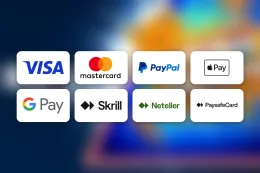
To make your BoyleSports deposit, log in, open the cashier, choose a payment method, enter the amount and confirm. The steps above show the order. This page covers what sits behind them and what to do if a payment does not go through.
Deposits are made only on BoyleSports's own website or app, and this site has no cashier or payment form. If you need to reach the casino, use visit BoyleSports or go to your usual login route described in the login guide.
Before you start, have three things ready:
- your account details, so you are not stuck on a forgotten password halfway through;
- a payment method in your own name from the table above;
- the documents BoyleSports may ask for, which are Passport or driving licence and Recent bank statement or utility bill (proof of address).
Choose a method with cashing out in mind as well. Paysafecard works for deposits only, while the other methods are listed for both directions.
What happens behind a deposit
Every UK-licensed operator must verify your age and identity before you can deposit or play, and BoyleSports requires verification. You will need Passport or driving licence and Recent bank statement or utility bill (proof of address). These documents confirm who you are and where you live. Having clear copies ready means the check is less likely to hold up your first payment. The verification guide goes through each document in more detail.
The payment itself is checked too, and the name matters. Use a card, wallet or voucher account registered in your own name, and make sure that name matches the one on your BoyleSports account. A payment from a method that belongs to someone else, such as a partner's card, can lead to a failed payment or questions from the payments team. Do not use another person's method, even with their permission.
How the methods differ
The payment methods table above lists what BoyleSports accepts: Visa Debit, Mastercard Debit, PayPal, Apple Pay, Skrill and Paysafecard. They work in different ways:
- Visa Debit and Mastercard Debit take the money straight from your bank account. Credit cards are banned for gambling in Great Britain, so a credit card will not work and you should not try to use one.
- PayPal and Skrill are e-wallets. You pay from the wallet balance or from whatever funding source you have linked there, and the deposit appears on the wallet's own statement.
- Apple Pay pays through a card stored on your device. Your bank approves or declines the payment, so check with your bank if a payment is refused.
- Paysafecard is a prepaid voucher. You can only spend what the voucher holds, and it is listed for deposits only, so it cannot receive withdrawals.
None of these is described here as faster than another, so choose the one you already use and trust. If you plan to cash out later, check the withdrawal column of the table first. The withdrawals guide explains how that side works.
Offers and deposits
If you are thinking about the welcome bonus, read its terms on the welcome bonus page before you pay in, because offers carry their own conditions. T&Cs apply. Making a deposit does not oblige you to take any offer.
18+ · T&Cs apply
Common problems and what to do
The payment is declined. Check the simple things first: the card number, expiry date and security code are correct, the card is a debit card, it is in your name and the balance covers the amount. If you use Apple Pay, make sure the card on your device is one your bank accepts for online gambling payments, and try another listed method if it is declined. If the payment still fails, try another method from the table. Repeated attempts with the same details usually produce the same result.
The money has left your account but your balance has not changed. Look at your bank or wallet statement to see whether the payment shows as completed, pending or declined. Note the date, the amount and the method, then contact support with those details. Do not make the same deposit again until you know what happened to the first one.
You have forgotten your password. Use the password reset option on BoyleSports's own login page and follow it through. The login guide explains what to have ready. Never give your password to anyone who asks for it, including someone claiming to be from support.
A verification document is rejected. The usual causes are a blurred photo, cropped corners, an expired document, or a name or address that does not match your account. Retake the picture in good light with all four edges visible and send it again. Proof of address needs to be a recent bank statement or utility bill, as listed in Passport or driving licence and Recent bank statement or utility bill (proof of address). If your details have changed since you registered, tell support rather than trying to work around the mismatch. You must not alter documents or use anyone else's.
The method you want is not on the list. Only the methods in the table above are accepted for deposits. If your preferred one is missing, choose another rather than looking for a workaround.
A deposit has not appeared in your balance yet. Check your bank or wallet statement to see whether the payment is pending, completed or declined. If it still has not shown up after a reasonable wait, contact support with the details of the payment.
When to contact support
Contact support if a payment shows as taken but your balance has not changed, if a document keeps being rejected, or if you cannot get back into your account. Support is available as follows: 24/7 live chat; email care@boylesports.com; phone. Live chat is the option for an immediate question about a payment, and email suits cases where you want to attach a screenshot. Have your username, the date, the amount and the payment method ready. You can find the full list of contact routes on the contact page.
Keeping your account and spending under control
Enter your password only on BoyleSports's own website or app, and be wary of links in messages, emails or social media posts that lead to a login or payment page. If you are not sure, open the site yourself instead of following the link. Do not share your login details, and do not pass card or wallet details to anyone who contacts you claiming to be from support.
Set a deposit limit in your BoyleSports account before you pay in. A limit is easier to choose before you start playing than in the middle of a session, and you can read about the other controls on the safer gambling page. Treat the amount you deposit as the cost of entertainment, not as an investment. Pay only from money you can spare, and never from funds set aside for bills or rent.
Keep your documents up to date and easy to find: a passport or driving licence, and a bank statement or utility bill that is recent and shows your current address. If you move home or change your name, update your account details so that they still match your payment methods.
Check your bank or wallet statement now and then and compare it with your account history. If something does not match, contact support straight away. Keep the payment confirmations from your bank or wallet until any problem has been resolved.
The full conditions for using the cashier are in the terms and conditions. If you plan to cash out later, read the withdrawals guide first, so you know which methods work in both directions.